Separate the shooter from the bullet
This lesson makes the ship shoot. But the more interesting result is the Hierarchy at the end of it: full of Bullet_Player(Clone) objects appearing and disappearing on a loop, which is the entire reason lesson 4 exists.
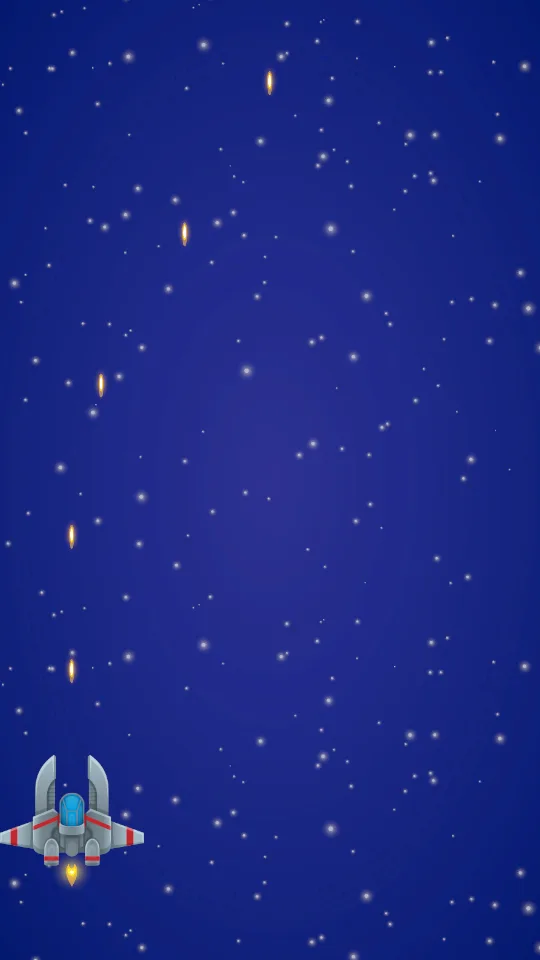
Here is the target:

Start from the lesson 2 scene and save it as SEU_03_Shoot. There are no enemies yet, so bullets damage nothing.
Shooting splits across two scripts. PlayerShooting decides when and where a bullet is created. Projectile decides how that bullet travels and how long it lives. They split because their lifetimes differ: when the ship turns or stops firing, bullets already in flight keep going on their own.
A prefab is the mould, an instance is the copy
A prefab is a GameObject saved as an asset so it can be duplicated. Edit the prefab and every copy follows. Anything created while the game runs — bullets, enemies, effects — should be a prefab.
Build the bullet in this order. Create an Empty named Bullet_Player, add a Sprite Renderer with the laser sprite on Sorting Layer Projectiles, and scale it so it reads smaller than the ship. Add the Projectile component from the section below, then a Rigidbody 2D with Body Type Kinematic and Interpolate enabled. Set Speed 14 and Lifetime 2.
Kinematic is chosen for the same reason as lesson 2: position comes from code, and physics is only here to detect collisions in lesson 5.
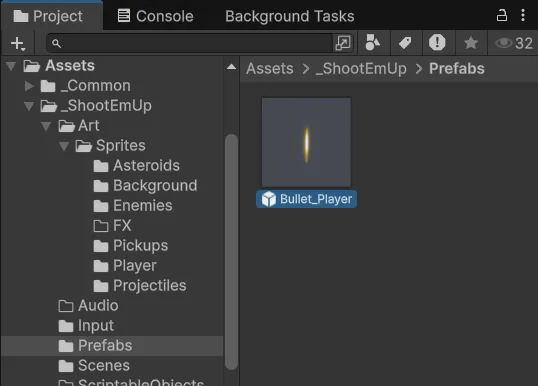
Drag Bullet_Player from the Hierarchy into the Prefabs folder. Unity writes a .prefab file and the Hierarchy name turns blue:
Double-click the prefab to open Prefab Mode. The window looks much like a normal Scene view but contains only the prefab, and the Inspector now edits the mould itself:
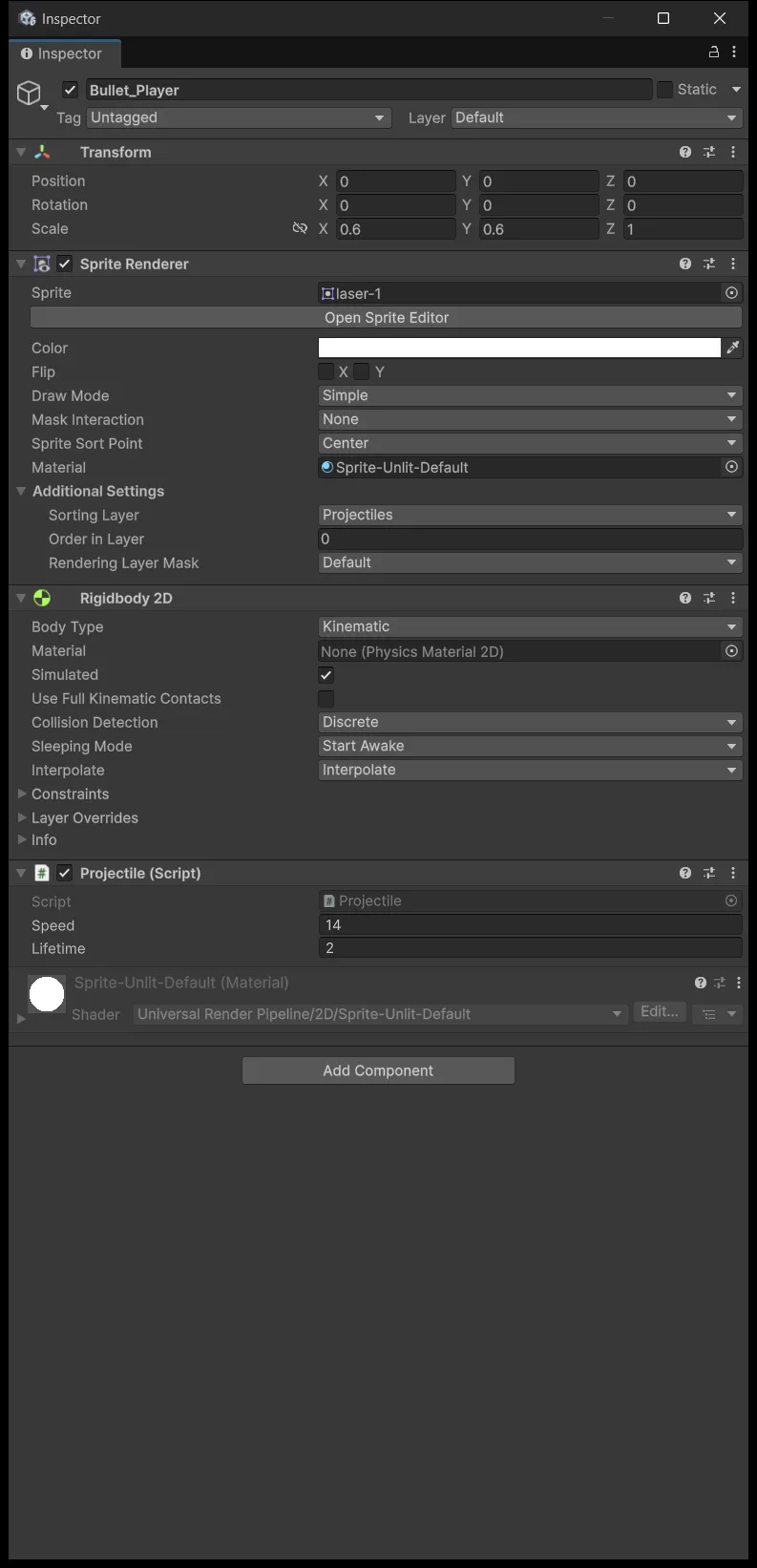
Telling those two modes apart matters more than it looks. Editing in Prefab Mode changes the mould and every copy follows. Editing an instance in the scene changes only that copy, and Unity marks the changed row in bold. Lesson 6 uses exactly that mechanism to build enemy variants.
When you are done, delete Bullet_Player from the Hierarchy and keep only the prefab. A mould does not need a copy sitting in the scene.
Make one bullet fly first
Create Scripts/Combat/Projectile.cs. This script only handles which way the bullet travels and how long it survives.
Assets/_ShootEmUp/Scripts/Combat/Projectile.cs
using UnityEngine;

namespace ShootEmUp.Combat
{
    [RequireComponent(typeof(Rigidbody2D))]
    public sealed class Projectile : MonoBehaviour
    {
        [Tooltip("World units per second.")]
        [SerializeField] private float speed = 14f;

        [Tooltip("Seconds before the projectile removes itself, even if it hit nothing. Keeps the scene from filling up.")]
        [SerializeField] private float lifetime = 2f;

        private Rigidbody2D body;

        private void Awake()
        {
            body = GetComponent<Rigidbody2D>();
        }

        private void OnEnable()
        {
            Destroy(gameObject, lifetime);
        }

        private void FixedUpdate()
        {
            body.MovePosition(body.position + (Vector2)transform.up * (speed * Time.fixedDeltaTime));
        }
    }
}
Two details are worth pausing on.
transform.up rather than Vector2.up: the bullet travels along its own rotation, not the world's Y axis. So when lesson 5 needs enemies firing downward, we rotate the prefab 180° and reuse the same script.
The timer lives in OnEnable rather than Start: lesson 4 will enable and disable objects instead of creating them, and Start runs only once in an object's life while OnEnable runs every time it is switched on. Writing it this way now saves an edit later.
This is the create-and-destroy lifetime. Lesson 4 replaces the whole Destroy schedule with a return-to-pool. If at that point you only swap Instantiate for the pool but keep Destroy(gameObject, lifetime), a bullet being reused gets deleted mid-flight.
Test it right away: drag the prefab into the scene near the middle and press Play. The bullet flies upward and disappears after about 2 seconds. Stop, delete the test instance, keep the prefab.
Muzzle is a position you can adjust by eye
Create an Empty as a child of Player named Muzzle, local position around (0, 1.05, 0) and local rotation 0. It needs no renderer or collider, since PlayerShooting only reads its Transform.
Why not write transform.position + Vector3.up * 1.05f in code: swap the ship sprite, or add a second barrel, and you just drag Muzzle in Scene view. The Hierarchy is where position data belongs, and dragging by eye beats guessing numbers in code.
Fire is a held-or-released intent
Open ShmupControls, and in the Gameplay map add an Action named Fire with Action Type Button. Add three bindings: Space, left mouse button, and the gamepad's buttonSouth. Press Save Asset.
Create Scripts/Player/PlayerShooting.cs.
Assets/_ShootEmUp/Scripts/Player/PlayerShooting.cs
using UnityEngine;
using UnityEngine.InputSystem;

namespace ShootEmUp.Player
{
    public sealed class PlayerShooting : MonoBehaviour
    {
        [Tooltip("Input Actions asset that contains the Gameplay/Fire action.")]
        [SerializeField] private InputActionAsset controls;

        [Tooltip("Prefab spawned for every shot. Its 'up' must point in the travel direction.")]
        [SerializeField] private GameObject projectilePrefab;

        [Tooltip("Where the projectile appears. A child Transform at the ship's nose.")]
        [SerializeField] private Transform muzzle;

        [Tooltip("Fire rate while the button is held.")]
        [SerializeField] private float shotsPerSecond = 6f;

        private InputAction fireAction;
        private float nextShotTime;

        private void Awake()
        {
            fireAction = controls.FindAction("Gameplay/Fire", throwIfNotFound: true);
        }

        private void OnEnable()
        {
            fireAction.Enable();
        }

        private void OnDisable()
        {
            fireAction.Disable();
        }

        private void Update()
        {
            if (!fireAction.IsPressed() || Time.time < nextShotTime)
            {
                return;
            }

            Instantiate(projectilePrefab, muzzle.position, muzzle.rotation);
            nextShotTime = Time.time + 1f / shotsPerSecond;
        }
    }
}
IsPressed() stays true the whole time the button is held, unlike WasPressedThisFrame() which is true for exactly one frame at the moment of the press. For one shot per press, switch to the second one.
The cooldown counts Time.time, not frames. nextShotTime is the earliest moment the next shot is allowed, and at 6 shots per second the target gap is 1/6 ≈ 0.167 seconds:
t = 0 · Fire immediately if held
0 < t < 0.167 · Wait, even while still held
t ≥ 0.167 · The next eligible frame fires
Counting frames instead of time is the classic mistake: a 144 fps machine would fire almost five times faster than a 30 fps one. The approach above gives 6 shots per second everywhere. To be precise, the cadence is still quantised to frames, so at very low frame rates the real number falls slightly short.
Firing is handled in Update rather than FixedUpdate, because firing responds to input and needs to feel frame-tight. The bullet travels in FixedUpdate because it is a Rigidbody.
Three references with three different meanings
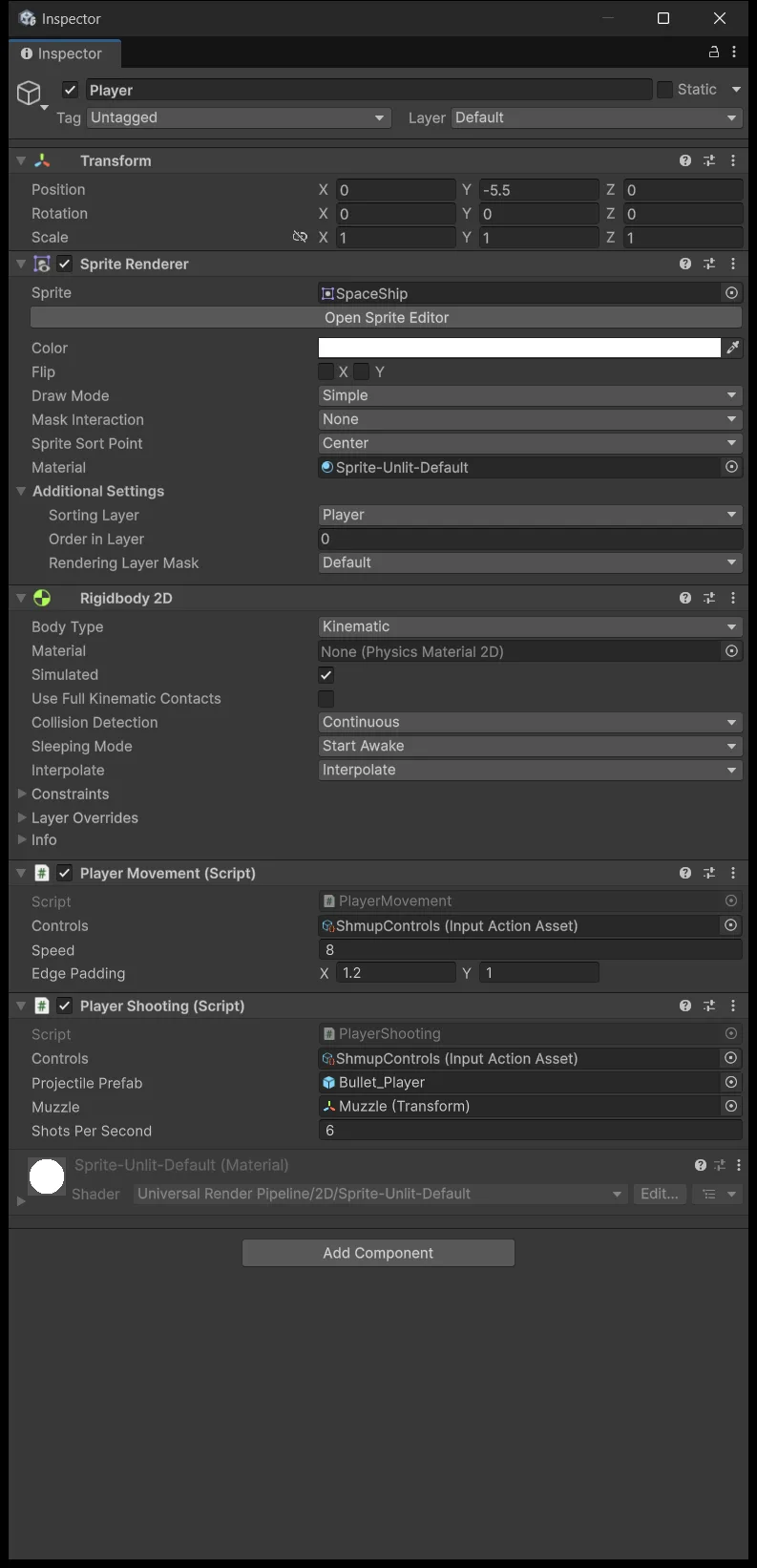
Add the PlayerShooting component to Player. The Inspector shows three empty fields:
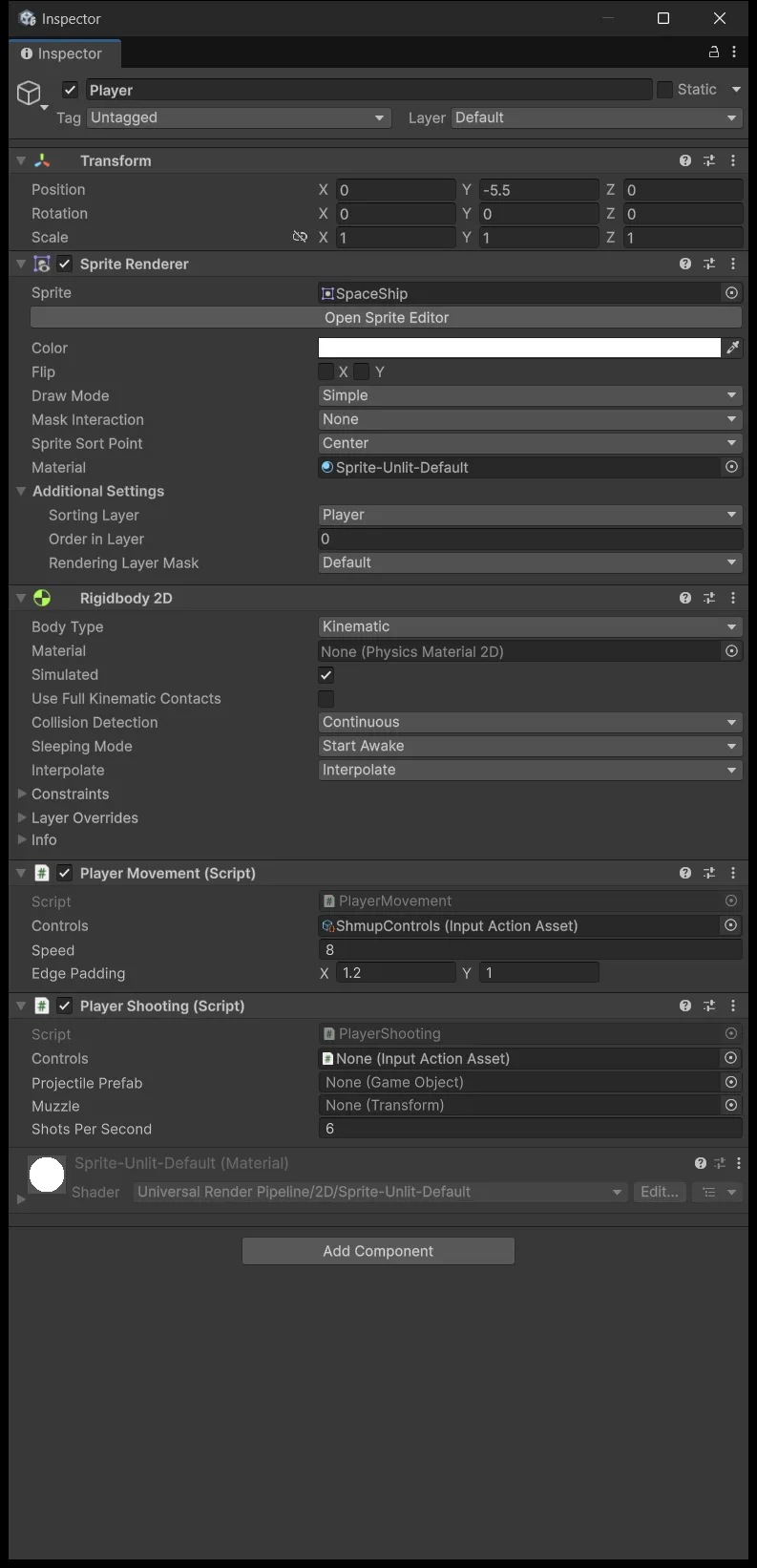
| Field | Drag from | Value |
|---|---|---|
| Controls | Project | ShmupControls |
| Projectile Prefab | Project | Bullet_Player.prefab |
| Muzzle | Hierarchy | Player/Muzzle |
| Shots Per Second | Type it | 6 |
The middle column is where mistakes happen. Controls and Projectile Prefab are assets, so they come from the Project window. Muzzle is typed Transform, so it only accepts an object that exists in the scene and must come from the Hierarchy. Drag from the wrong place and the field stays None while you keep trying.
Watch both the firing and the stopping
Press Play, hold Fire, and move at the same time. Bullets must appear at the ship's nose at the moment of firing and then travel independently rather than sticking to the ship. Release Fire and no new bullets appear while existing ones keep flying. Wait more than 2 seconds and everything gets cleaned up.
Now expand the Hierarchy and watch it while holding Space:
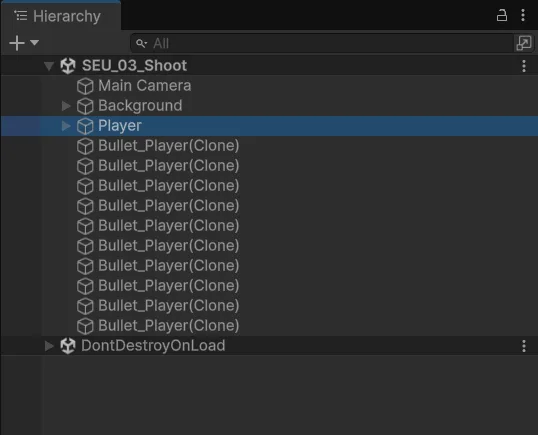
The number of bullets alive at once is the fire rate times the lifetime, roughly 6 × 2 = 12. That is an estimate; the real figure wobbles around it frame by frame.
Every Bullet_Player(Clone) row in that screenshot is one Instantiate allocating memory, and every disappearance is one Destroy leaving garbage behind for the collector. At twelve bullets you will not feel it. Lesson 7, with a wave of 30 enemies and their bullets, is a different story.
I left this lesson working that way on purpose, which is how I tend to work anyway: make it exist first, you can make it good later. Once a shooting system actually runs, lesson 4 has something concrete to improve, and you see the problem on your own machine instead of reading advice about avoiding it.
Source for this stage
Download the lesson 3 scripts — code and assembly definitions only, no scenes, prefabs, or the pictured artwork. When upgrading from an earlier lesson, overwrite files at the same paths.
Next: Shmup #4.