Instantiate → travel → Destroy
Every shot gets a new instance.
Rent → position → enable → travel → return
An existing instance begins a new lifetime.
360 Instantiate calls per minute of holding the button
Lesson 3 left you with a working gun and a Hierarchy flickering with clones. Six shots per second means 360 Instantiate calls and 360 Destroy calls for every minute you hold the button, counting only one player's bullets.
Each Instantiate makes Unity allocate a GameObject, allocate every component on it, and copy the prefab's data across. Each Destroy leaves garbage for the collector. The collector does not tidy up steadily — it lets work pile up and then runs once, and that run is an unusually long frame.
The shooting behavior in this lesson stays exactly as it was in lesson 3. Only resource ownership changes. Save the scene as SEU_04_Pool.
What a pool is
The idea is simpler than its name. Instead of manufacturing a new bullet for every shot and throwing it away, you prepare a tray of bullets up front. Take one when you need it, put it back when you are done.
What makes it different from normal thinking is that an object in a pool has no dead state. It moves back and forth between two states, and both of them mean "alive in memory":
Inactive (in the pool)
      │ Get()
      ▼
   Active (in flight)
      │ Release()
      ▼
Inactive (in the pool)
A pool keeps inactive copies ready for reuse, and creates more when it runs out. The pattern did not come from games and is not specific to Unity: a database connection pool and a web server's thread pool are the same idea applied to different resources.
To be straight about it, pooling is not automatically faster in every situation. What you buy is control over when objects get created and destroyed; how much faster it actually runs is a question for measurement.
What a pool costs you
Two costs, both real.
The first is memory held permanently. Twenty bullets exist from the moment the game starts until it quits, including levels where you never fire a shot.
The second matters far more: state does not clean itself. A freshly instantiated object always carries the prefab's defaults. An object taken from a pool carries the state of its previous life — old position, leftover health, velocity, a coroutine still running. This is the single biggest source of bugs when you start pooling, and it is the reason for the whole OnEnable discussion below. A new bullet gets a fresh lifetime, so a reused bullet needs a fresh lifetime, direction, and position too.
When pooling is worth it
Pooling pays off when both of these hold: the object is created and destroyed repeatedly, usually in bursts; and the cost of creating it is significant compared to the cost of letting it sit idle in memory.
In games the list of good candidates is fairly stable: bullets, enemies, asteroids, explosion effects, floating damage numbers, AudioSource objects for overlapping sounds, and item rows in a long scrolling UI list. What they share is high count, short life, and identical shape.
On the other side, do not pool something that exists once per game such as the Player, the Camera, or a GameManager, and do not pool things created a handful of times per run such as doors, chests, or a single boss. Pooling something that does not need it costs you memory plus the risk of forgetting a reset, and buys you nothing.
The four ObjectPool callbacks
Unity ships ObjectPool<T> in the UnityEngine.Pool namespace, and it works for any C# type rather than GameObjects specifically. It knows nothing about GameObjects, so it asks you for four things:
| Callback | Runs when | What we do |
|---|---|---|
createFunc | The pool has no spare copies | Instantiate the prefab |
actionOnGet | Someone calls Get() | Position it, then enable it |
actionOnRelease | Someone calls Release() | Disable it |
actionOnDestroy | The pool holds too many spares | Destroy it |
That table more or less predicts the rest of the lesson. The saving lives entirely in the two middle rows: renting and returning only toggle a flag, allocating nothing.
Three roles and one contract
| Component | Owns | Does not own |
|---|---|---|
| PrefabPool | Creating, holding spares, positioning before enabling | Damage rules |
| PooledObject | Knowing where to return; blocking double returns | Deciding when a lifetime ends |
| Projectile | Moving and deciding its lifetime is over | Managing the list of spares |
Worth noticing: Projectile calls PooledObject, never PrefabPool directly. The bullet does not need to know which pool holds it, or even whether a pool is involved at all. That is what lets the same prefab work inside a pool and also work when you drag one into the scene by hand to test.
Build the pool in a shared assembly
This is the first script in the series that does not serve the space shooter specifically, so it does not live in _ShootEmUp but in _Common. The folder that has been empty since lesson 0 finally has a job.
Create _Common/Scripts/BillLab.Common.asmdef, named BillLab.Common. Then select ShootEmUp.asmdef and add a reference to BillLab.Common.
The dependency runs one way only: the game references Common, Common knows nothing about ShootEmUp. Let _Common call back into ShootEmUp and Unity reports a circular reference and neither assembly compiles — quite apart from the fact that Common would stop being shared, having bound itself to one specific game.
Create two files under _Common/Scripts/Pooling. Read PooledObject first because it is the smaller one: it only stores where to return, and whether it already has.
Assets/_Common/Scripts/Pooling/PooledObject.cs
using UnityEngine;
namespace BillLab.Common.Pooling
{
    [DisallowMultipleComponent]
    public sealed class PooledObject : MonoBehaviour
    {
        public PrefabPool Pool { get; internal set; }
        private bool released;
        private void OnEnable() => released = false;
        public void Release()
        {
            if (released) return;
            released = true;
            if (Pool != null) Pool.Release(gameObject);
            else Destroy(gameObject);
        }
    }
}
OnEnable resets the flag for the new lifetime. A second Release within the same lifetime is ignored, so two callers returning the same object cannot corrupt the pool. But that is only a safety net for returning the object: whatever deals damage still has to guard itself against applying damage twice, because returning to a pool and dealing damage are two separate responsibilities.
The else Destroy branch covers objects placed in the scene by hand, the ones no pool owns. Thanks to it, a bullet you drag into a scene to test still disappears the way you expect.
Now the pool itself.
Assets/_Common/Scripts/Pooling/PrefabPool.cs
using UnityEngine;
using UnityEngine.Pool;
namespace BillLab.Common.Pooling
{
    public sealed class PrefabPool : MonoBehaviour
    {
        [SerializeField] private GameObject prefab;
        [SerializeField, Min(0)] private int prewarm = 20;
        [SerializeField, Min(1)] private int maxSize = 100;
        private ObjectPool<GameObject> pool;
        private Transform staging;
        public int CountActive => pool.CountActive;
        public int CountInactive => pool.CountInactive;
        private void Awake()
        {
            var holder = new GameObject("Inactive factory");
            holder.SetActive(false);
            staging = holder.transform;
            staging.SetParent(transform, false);
            pool = new ObjectPool<GameObject>(Create, null,
                go => go.SetActive(false), go => Destroy(go), true,
                Mathf.Max(1, prewarm), Mathf.Max(1, maxSize));
            var warm = new GameObject[Mathf.Min(prewarm, Mathf.Max(1, maxSize))];
            for (var i = 0; i < warm.Length; i++) warm[i] = pool.Get();
            foreach (var go in warm) pool.Release(go);
        }
        private GameObject Create()
        {
            var go = Instantiate(prefab, staging);
            go.SetActive(false);
            go.transform.SetParent(transform, false);
            var pooled = go.GetComponent<PooledObject>();
            if (pooled == null) pooled = go.AddComponent<PooledObject>();
            pooled.Pool = this;
            return go;
        }
        public GameObject Get(Vector3 position, Quaternion rotation, Vector3? scale = null)
        {
            var go = pool.Get();
            go.transform.SetPositionAndRotation(position, rotation);
            go.transform.localScale = scale ?? prefab.transform.localScale;
            var body = go.GetComponent<Rigidbody2D>();
            if (body != null)
            {
                body.position = position;
                body.rotation = rotation.eulerAngles.z;
                body.linearVelocity = Vector2.zero;
                body.angularVelocity = 0f;
            }
            go.SetActive(true);
            return go;
        }
        public void Release(GameObject go) => pool.Release(go);
        private void OnDestroy() => pool?.Clear();
    }
}
Three parts of this file deserve explanation.
Inactive factory is where this lesson goes past the usual tutorial. Common pooling guides just Instantiate and then SetActive(false) on the next line. The problem is that between those two statements the object has already run Awake and OnEnable exactly like a real spawn, so an explosion effect can fire and a timer can start counting. Creating the object under a parent that is already disabled means it is born inactive, and all twenty prewarm rounds trigger nothing at all.
The prewarm loop must rent all N before returning any of them. ObjectPool<T> only creates an instance when somebody calls Get, and defaultCapacity merely sizes the internal store rather than creating objects. Rent and release inside the same loop iteration and the pool keeps handing back the copy you just returned, leaving you with one object reused twenty times.
Max Size caps how many spares are kept, not how many bullets may be in flight. Surplus spares get destroyed. This is spelled out in Unity's ObjectPool documentation.
Inside Get, scale ?? prefab.transform.localScale is C#'s null-coalescing operator on a Vector3?, a nullable struct. It has nothing to do with the lifetime check on UnityEngine.Object — that still has to be written if (pooled == null) as it is in Create, because a destroyed Unity object is not truly null to C#.
Migrate both the shooter and the bullet
Replace Projectile entirely with the version below. Do not keep lesson 3's Destroy(gameObject, lifetime).
Assets/_ShootEmUp/Scripts/Combat/Projectile.cs
using BillLab.Common.Pooling;
using UnityEngine;

namespace ShootEmUp.Combat
{
    [RequireComponent(typeof(Rigidbody2D), typeof(PooledObject))]
    public sealed class Projectile : MonoBehaviour
    {
        [Tooltip("World units per second.")]
        [SerializeField] private float speed = 14f;

        [Tooltip("Seconds before the projectile goes back to the pool, even if it hit nothing.")]
        [SerializeField] private float lifetime = 2f;

        private Rigidbody2D body;
        private PooledObject pooled;
        private float despawnTime;

        private void Awake()
        {
            body = GetComponent<Rigidbody2D>();
            pooled = GetComponent<PooledObject>();
        }

        private void OnEnable()
        {
            despawnTime = Time.time + lifetime;
        }

        private void Update()
        {
            if (Time.time >= despawnTime)
            {
                pooled.Release();
            }
        }

        private void FixedUpdate()
        {
            body.MovePosition(body.position + (Vector2)transform.up * (speed * Time.fixedDeltaTime));
        }
    }
}
This is where the cost described above has to be paid. despawnTime is recalculated in OnEnable rather than Start, because the instance is reused. Start and Awake run once in an object's entire life, while OnEnable runs every time it is switched on.
The rule that falls out of this, and applies to every pooled object from here on: anything that must be correct at the start of each lifetime belongs in OnEnable. Lesson 5 adds enemies with health, and forgetting this rule means a freshly spawned enemy arrives carrying 0 HP from its previous death and dies again immediately.
The timer sits in Update safely because Update does not run while an object is inactive, so a bullet already returned to the pool cannot keep counting and return itself a second time.
PlayerShooting changes less: the projectilePrefab field of type GameObject becomes projectilePool of type PrefabPool, and the Instantiate(...) call becomes projectilePool.Get(muzzle.position, muzzle.rotation). The complete file is in the lesson 4 source package, input handling included and unchanged.
Assemble the scene in five steps
Follow this order, because the prefab has to be finished before the pool points at it.
Step 1. Open the Bullet_Player prefab and confirm it has a Rigidbody 2D, Projectile, and PooledObject. The [RequireComponent] attribute usually adds components when you edit the code, but not reliably for a prefab that already existed, so this is something to verify with your eyes:
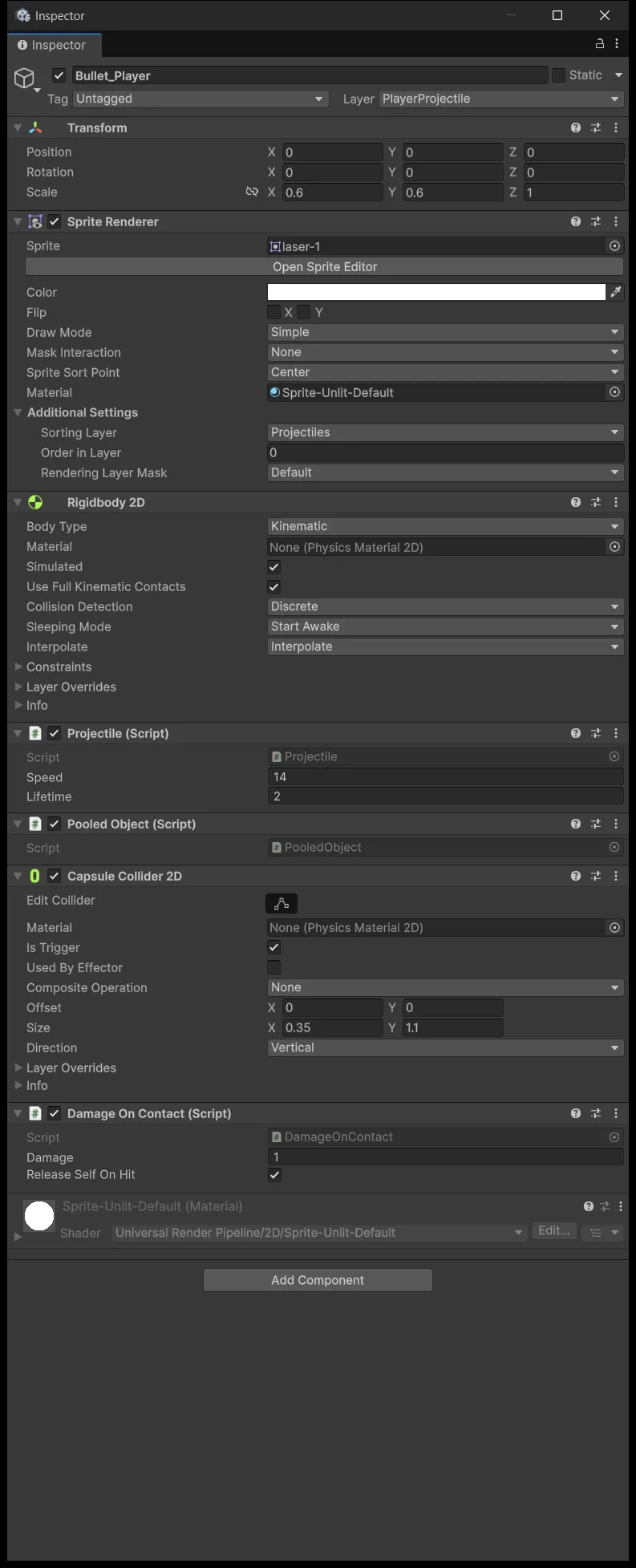
If there is no Pooled Object row, add the component manually.
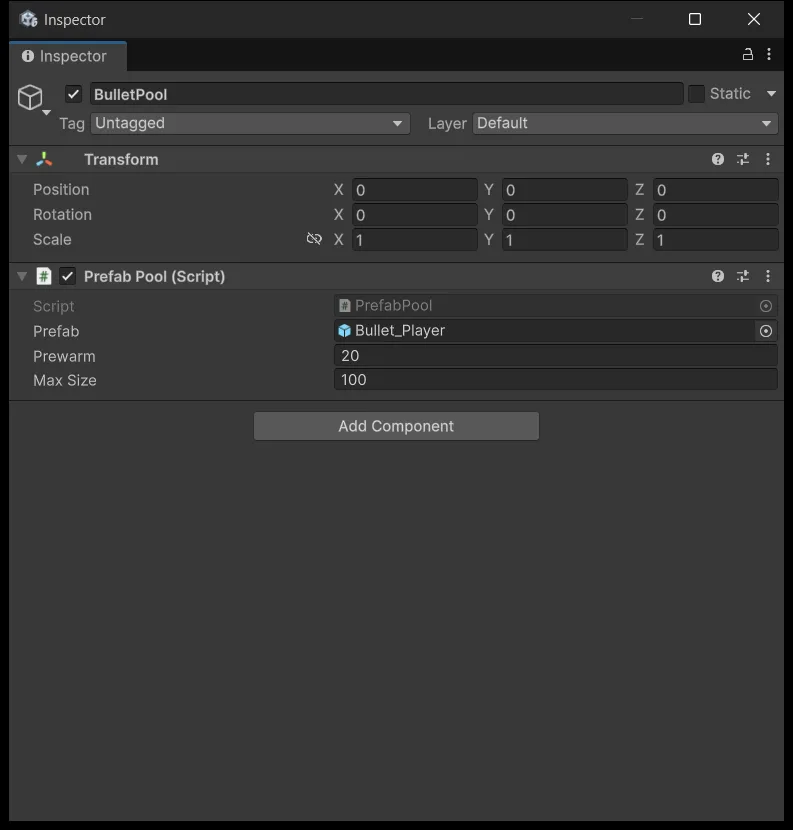
Step 2. In the Hierarchy, create an Empty named BulletPool.
Step 3. Add the PrefabPool component to it and fill in: Prefab dragged from the Project window as Bullet_Player, Prewarm 20, Max Size 100.
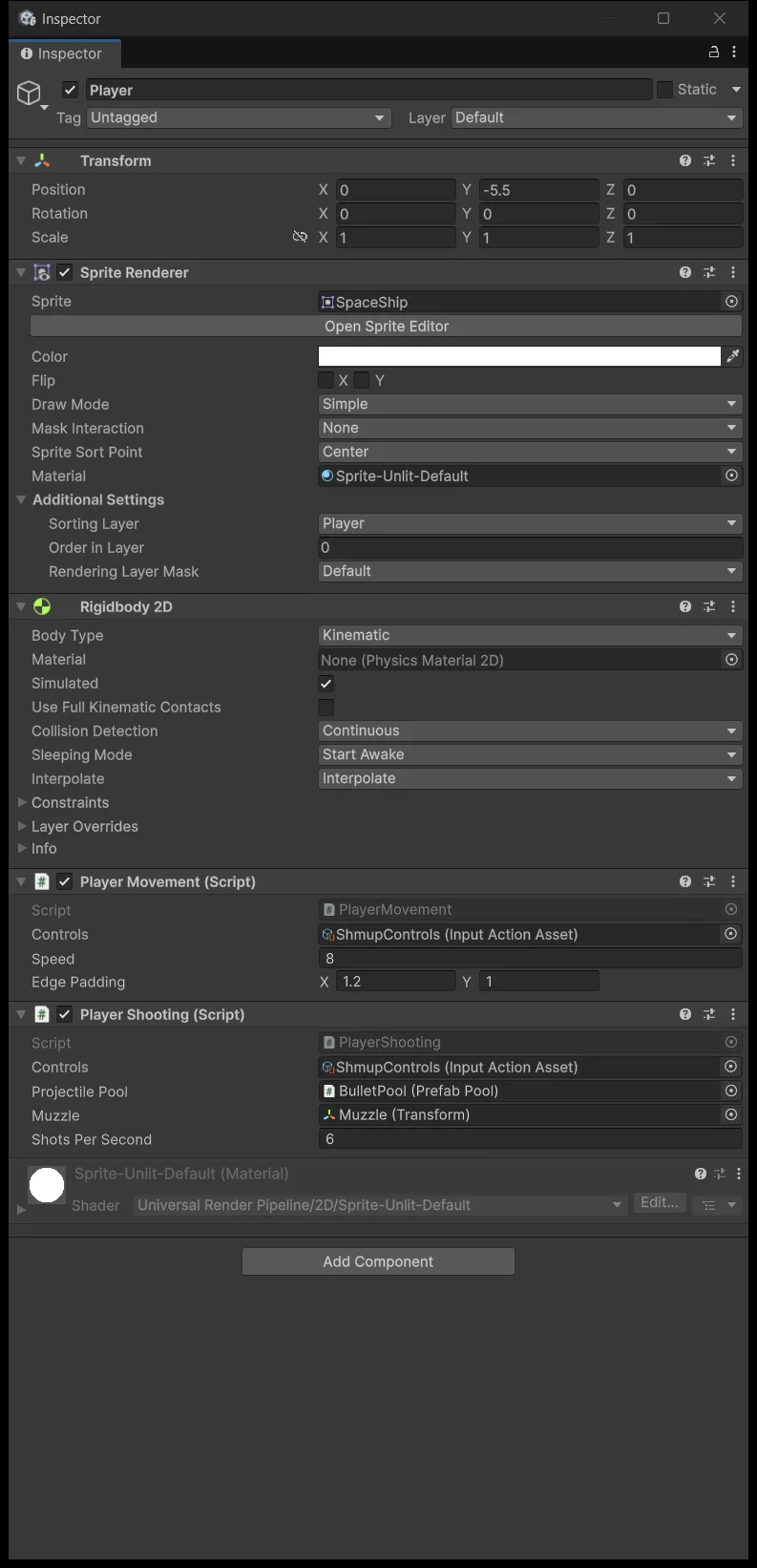
Step 4. Select Player and look at the PlayerShooting component. The old Projectile Prefab field is gone, replaced by Projectile Pool reading None. Changing a field's type means Unity drops the old reference rather than converting it:
Step 5. Drag BulletPool from the Hierarchy into that field. A PrefabPool field only accepts a component that exists in the scene, not an asset from Project. Once it is wired, confirm Controls and Muzzle are still intact:
The rent, return, rent-again test
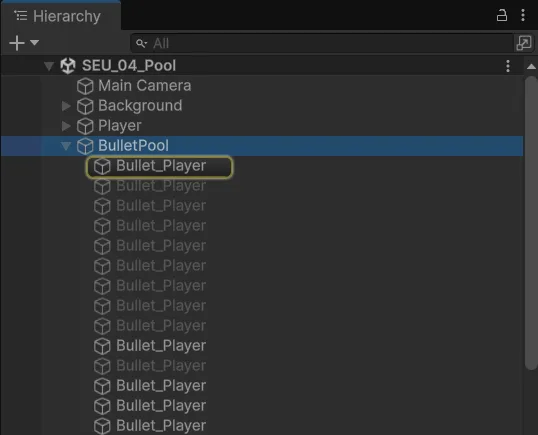
Press Play and expand BulletPool in the Hierarchy before you fire:
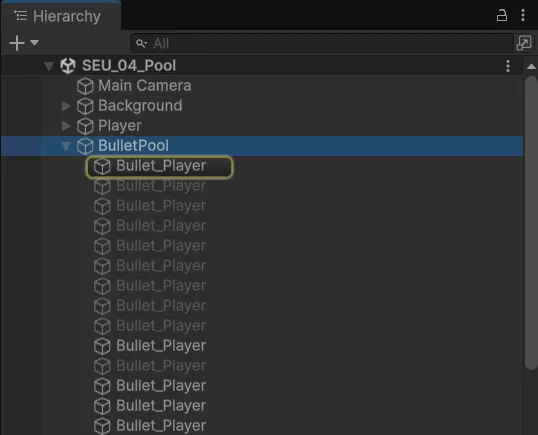
You see 20 greyed-out Bullet_Player objects, inactive, plus one object named Inactive factory. That is the safe creation parent described above, not a twenty-first bullet.
Now hold Space: bullets light up one at a time, fly, and grey out again. No new rows appear and none disappear.

The numbers I measured at 6 shots per second: the pool holds exactly 20 bullets from start to finish, peaks at 11 active / 9 inactive, and two seconds after releasing the key one is still active. No instance was created after Awake, which means a prewarm of 20 is more than enough for this cadence.
Test the reuse cycle next: fire, release, wait longer than Lifetime, then fire again. The old bullets must reappear at the Muzzle with a full lifetime rather than vanishing instantly.
After that, drop Prewarm to 1 and run again to watch the pool grow on demand, then set it back to 20. A growing pool is not a leak: when demand exceeds the available spares, creating more is the correct behavior. Just be aware you are allocating mid-match at that point, so matching Prewarm to real demand is better.
If the Console throws an already released exception, two places are calling Release on the same object. The released flag contains the damage, but find the second caller anyway rather than disabling collectionCheck to hide it.
How to actually compare performance
Open Window → Analysis → Profiler, switch to CPU Usage, and watch the GC Alloc column while holding Space. Compare the lesson 3 scene against the lesson 4 scene using one identical scenario: same duration, same fire rate, same machine, and start recording only after prewarm has finished.
Do not treat the number of child objects in the Hierarchy as evidence of better frame rates — it only tells you the pool is working, and says nothing about per-frame time. The required outcome of this stage is a correct reuse cycle. Lesson 5 adds one more reason for a bullet to return early: hitting something.
Source for this stage
Download the lesson 4 scripts — code and assembly definitions only, no scenes, prefabs, or the pictured artwork. When upgrading from an earlier lesson, overwrite files at the same paths.
Next: Shmup #5.