1.0 s · Spawn #1
1.8 s · Spawn #2
2.6 s · Spawn #3
4.6 s · Next wave, after a 2 second rest
A wave is a schedule, not a pile of objects
Three enemies placed by hand in the scene can be played exactly once. This lesson replaces them with a schedule: wait 1 second, release 3 enemies 0.8 seconds apart, rest 2 seconds, move to the next wave.
Save the scene as SEU_07_Waves.
Read the timeline above carefully, because it contains the part people get wrong. The first enemy arrives at 1.0 seconds, the second at 1.8, the third at 2.6 — so interval sits between spawns only. After the last one we wait just delayAfter, which is 2 seconds, giving 4.6. The common mistake is waiting one more interval after the final spawn, which pushes the next wave 0.8 seconds later than intended.
One more condition to settle up front: a wave counts as finished once it has spawned its full count, not once every enemy is dead. A "clear them all before the next wave" rule needs a separate counter tracking live enemies, and that is a different design.
The times above are the target schedule. Real timings are rounded to whatever frame the coroutine resumes on, so a few milliseconds of drift is normal.
From a schedule on paper to a WaveSet
| Field | Meaning | Example |
|---|---|---|
| enemy | Enemy type for this wave | InsectBasic |
| count | How many to spawn | 3 |
| interval | Seconds between two spawns | 0.8 |
| delayAfter | Seconds after the final spawn | 2 |
| loop | Replay the whole list | Off while testing one pass |
Assets/_ShootEmUp/Scripts/Data/WaveSet.cs
using System;
using UnityEngine;

namespace ShootEmUp.Data
{
    [CreateAssetMenu(menuName = "ShootEmUp/Wave Set", fileName = "Waves_New")]
    public sealed class WaveSet : ScriptableObject
    {
        [Serializable]
        public struct Wave
        {
            public EnemyData enemy;
            [Min(1)] public int count;
            [Tooltip("Seconds between two spawns inside this wave.")]
            [Min(0f)] public float interval;
            [Tooltip("Seconds to wait after the last spawn of this wave before the next wave starts.")]
            [Min(0f)] public float delayAfter;
        }

        public Wave[] waves = Array.Empty<Wave>();

        [Tooltip("Start again from the first wave when the last one is done.")]
        public bool loop = true;
    }
}
[Serializable] on the Wave struct is what lets Unity draw each wave row in the Inspector. Without it the code still compiles but the array shows up empty.
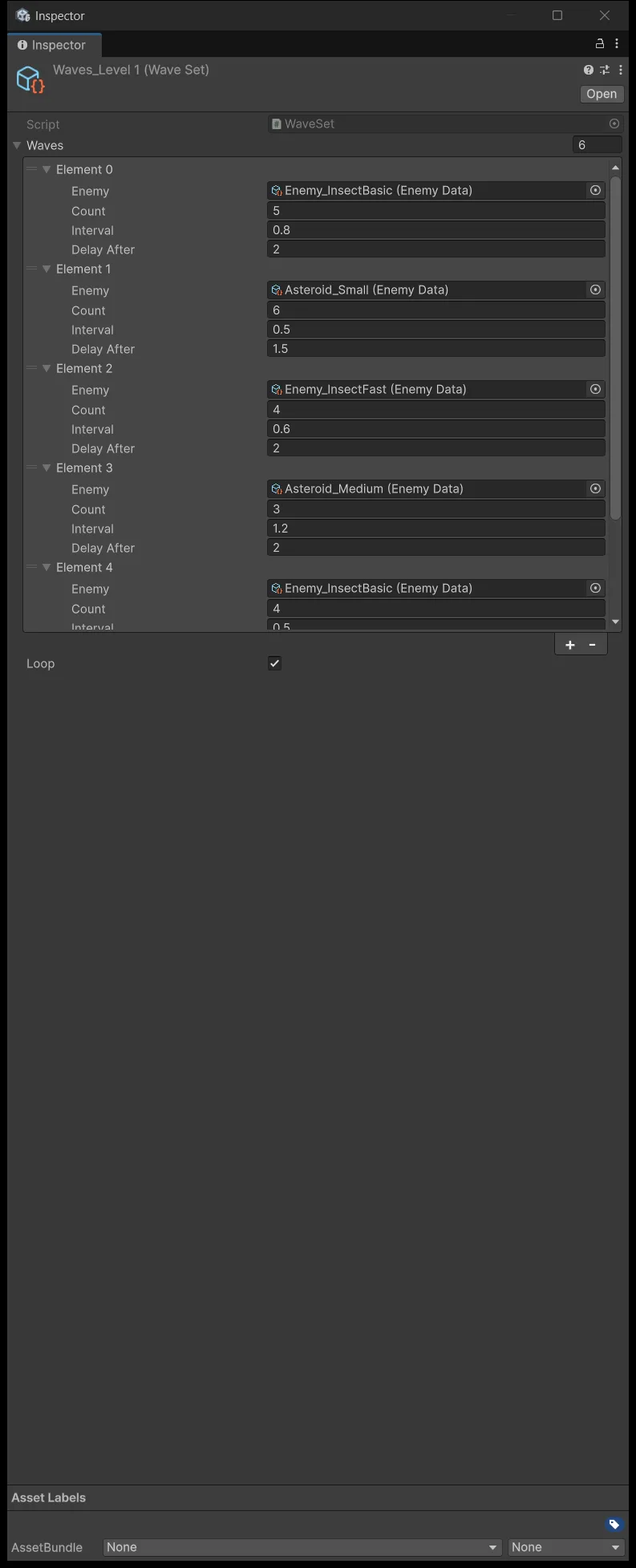
The division of labour matches lesson 6: the ScriptableObject holds the schedule, the spawner performs it. Create a Waves_Level1 asset in ScriptableObjects/Waves, enter just the single wave from the example for now, and leave Loop off.
A coroutine is a function with pause points
An ordinary function runs start to finish and hands control back, all inside one frame. You cannot put "wait 0.8 seconds" in the middle of it without freezing the whole game.
A coroutine is a function allowed to stop partway. At a yield it hands control back to Unity, and Unity resumes it from that exact point on a later frame. The timeline at the top of this lesson is the shape of a coroutine as it runs: each mark is a moment where it wakes, does a job, and sleeps again.
WaitForSeconds counts game time, and a coroutine is not a new thread — it still runs on the main thread, interleaved between frames.
Assets/_ShootEmUp/Scripts/Enemies/WaveSpawner.cs
using System.Collections;
using BillLab.Common.Pooling;
using ShootEmUp.Core;
using ShootEmUp.Data;
using UnityEngine;

namespace ShootEmUp.Enemies
{
    public sealed class WaveSpawner : MonoBehaviour
    {
        [Tooltip("Pool of the generic enemy prefab.")]
        [SerializeField] private PrefabPool enemyPool;

        [Tooltip("Which waves to play, in order.")]
        [SerializeField] private WaveSet waveSet;

        [Tooltip("How far above the visible top edge enemies appear.")]
        [SerializeField] private float spawnMargin = 1.5f;

        [Tooltip("Keep spawns this far from the left/right edges so big asteroids are not half off-screen.")]
        [SerializeField] private float horizontalPadding = 1f;

        [Tooltip("Seconds before the first wave, so the player can get ready.")]
        [SerializeField] private float initialDelay = 1f;

        private Coroutine running;

        private void OnEnable()
        {
            running = StartCoroutine(Run());
        }

        private void OnDisable()
        {
            if (running != null) StopCoroutine(running);
        }

        private IEnumerator Run()
        {
            if (waveSet == null || waveSet.waves == null || waveSet.waves.Length == 0) yield break;
            yield return new WaitForSeconds(initialDelay);

            do
            {
                foreach (var wave in waveSet.waves)
                {
                    if (wave.enemy == null || wave.count < 1) continue;
                    for (var i = 0; i < wave.count; i++)
                    {
                        Spawn(wave.enemy);
                        if (i + 1 < wave.count) yield return new WaitForSeconds(Mathf.Max(0f, wave.interval));
                    }

                    yield return new WaitForSeconds(wave.delayAfter);
                }
                yield return null;
            }
            while (waveSet.loop);
        }

        private void Spawn(EnemyData data)
        {
            var bounds = ScreenBounds.Get();
            var x = Random.Range(bounds.xMin + horizontalPadding, bounds.xMax - horizontalPadding);
            var position = new Vector3(x, bounds.yMax + spawnMargin, 0f);

            var enemy = enemyPool.Get(position, Quaternion.identity);
            enemy.GetComponent<Enemy>().Apply(data);
        }
    }
}
The line if (i + 1 < wave.count) is the interval rule from the top of the lesson written as code: only wait when another enemy is still coming. Drop that condition and you get one extra interval after the final spawn.
OnDisable stops the coroutine when the component is switched off. That is what lets lesson 8 stop the spawner with enabled = false and write nothing extra. Note this version restarts the schedule from the beginning when re-enabled rather than resuming.
The two guard lines at the top of Run handle an empty waveSet. Without them the do…while(loop) spins forever without ever hitting a yield and freezes the Editor the moment you press Play.
The pool written for bullets now runs enemies
Delete the three hand-placed enemies from lesson 5. Create an Empty named EnemyPool, add the PrefabPool component, and set Prefab to Enemy_Insect, Prewarm 15, Max Size 60.
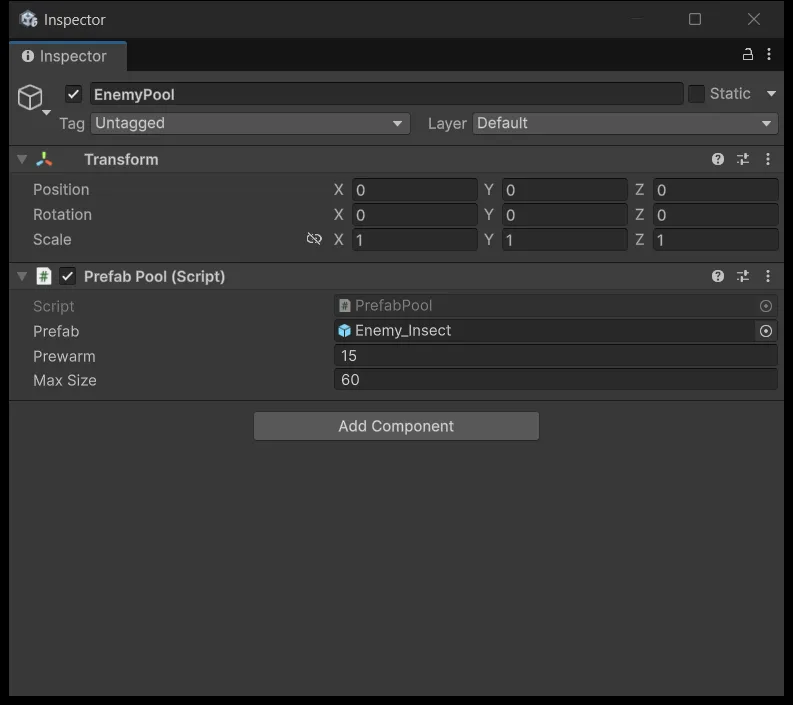
This is the first time _Common pays off. PrefabPool was written in lesson 4 for bullets and now runs enemies without a single edit, because it never knew anything about bullets — it only knows about one prefab and two operations, rent and return. That is also exactly why that folder is not allowed to reference ShootEmUp.
Next create an Empty named WaveSpawner and add the component of the same name. Two reference fields start empty:
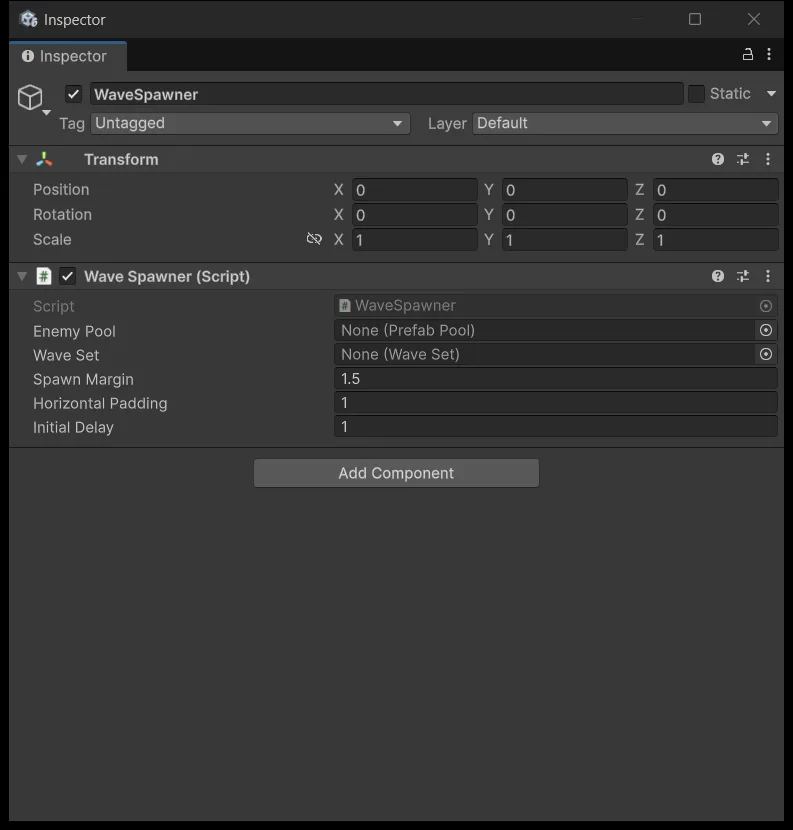
Drag EnemyPool from the Hierarchy into Enemy Pool, and Waves_Level1 from Project into Wave Set. Set Initial Delay 1, Spawn Margin 1.5, Horizontal Padding 1.
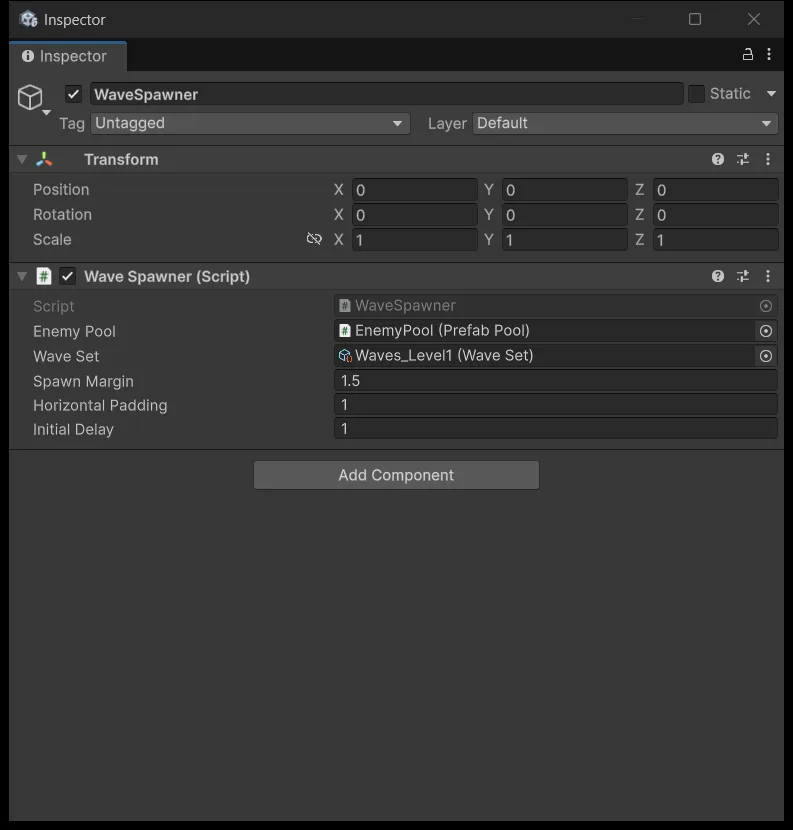
Spawn positions come from ScreenBounds: a random X within the horizontal bounds minus the padding, and a Y of the camera's top edge plus spawnMargin so enemies enter from outside the frame. The padding exists so the large asteroids in the next section do not appear half off the side of the screen.
Count three enemies before adding anything else
Press Play and count. Exactly three appear and then it stops, because Loop is off.
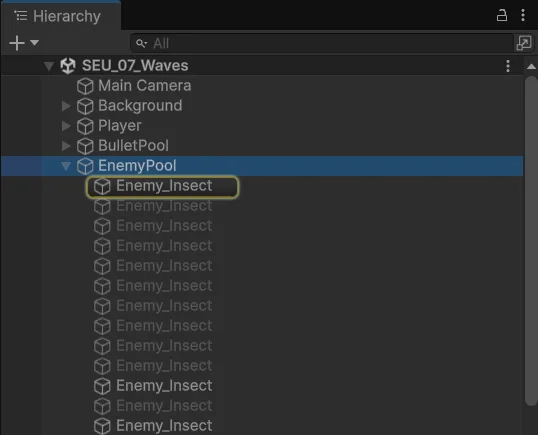
Next test: while the wave is running, untick the WaveSpawner component in the Inspector. No new enemies may appear, while the ones already in flight carry on. That is OnDisable stopping the coroutine.
Finish this countable test before adding more enemy types, because once the count goes up, counting gets much harder.
Asteroids are just more data
Replace EnemyData, Enemy, and EnemyMover with the lesson 7 versions from the source package. Those three files add colliderRadius and rotationSpeed, and Apply writes them onto the CircleCollider2D and the mover.
The thing to notice is that we write no Asteroid class at all. An asteroid differs from a bug in health, speed, collider size, and spin rate — all of which are numbers, so they belong to data rather than to code. This is lesson 6 paying dividends.
Create three new EnemyData assets:
| Asset | HP | Speed | Radius at scale 1 | Rotation °/s | Score |
|---|---|---|---|---|---|
| Asteroid_Small | 1 | 4 | 0.4 | 90 | 5 |
| Asteroid_Medium | 3 | 2.5 | 0.55 | 45 | 15 |
| Asteroid_Large | 6 | 1.5 | 0.85 | 20 | 40 |
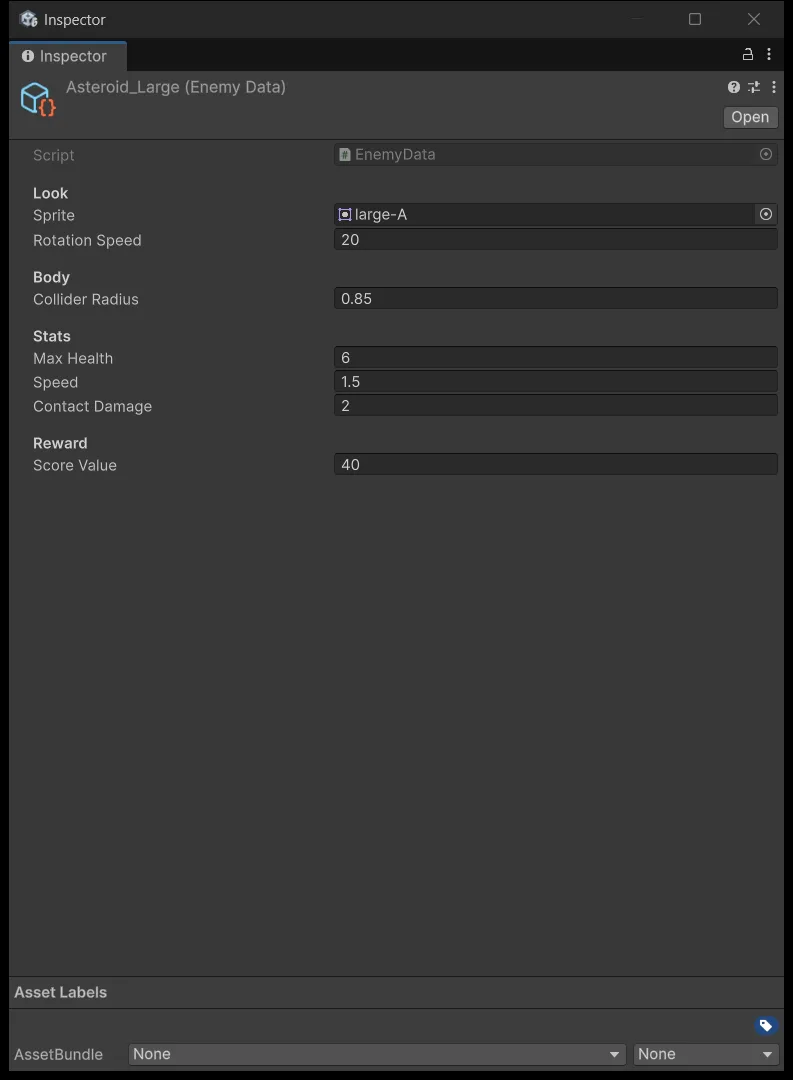
Radius is in local units and is affected by object scale, so a differently sized sprite needs the number adjusted against the collider you can see in Scene view. Keep Rotation Speed at 0 for the two bug types so they do not spin.
The Enemy_Insect prefab now serves bugs and asteroids alike, so its name no longer describes its role. Rename it to Enemy_Generic if you like — Unity keeps every reference intact.
A six-wave schedule you can copy
| Wave | Enemy | Count | Interval | Delay After |
|---|---|---|---|---|
| 1 | InsectBasic | 4 | 0.8 | 2 |
| 2 | Asteroid_Small | 6 | 0.5 | 2 |
| 3 | InsectFast | 4 | 0.6 | 2 |
| 4 | Asteroid_Medium | 3 | 1.0 | 2 |
| 5 | InsectBasic | 5 | 0.5 | 0.5 |
| 6 | Asteroid_Large | 1 | 0.8 | 3 |
Each row carries exactly one EnemyData. For a wave mixing bugs and asteroids, use two consecutive rows with the first row's delayAfter set to 0; there is no field that blends two types into one wave.
Wave 5 has a delayAfter of 0.5 so it runs almost straight into wave 6, building pressure ahead of the large asteroid. Turn Loop on once you have watched a full pass.

This stage is done when counts and rest periods match the schedule, enemies leaving the frame get cleaned up, new types arrive with the right sprite and health and collider, and disabling the spawner blocks the next spawn. You now have a level that runs continuously. The next lesson gives it a beginning and an end.
Source for this stage
Download the lesson 7 scripts — code and assembly definitions only, no scenes, prefabs, or the pictured artwork. When upgrading from an earlier lesson, overwrite files at the same paths.
Next: Shmup #8.