
Script đầu tiên
Tạo script: Project > Chuột phải > Create > C# Script → đặt tên PlayerController.
using UnityEngine;

public class PlayerController : MonoBehaviour
{
    void Start()
    {
        Debug.Log("Game bắt đầu!");
    }

    void Update()
    {
        Debug.Log("Frame mới!");
    }
}
MonoBehaviour— class cha mà mọi Unity script phải kế thừaStart()— chạy 1 lần khi object được kích hoạtUpdate()— chạy mỗi frame (60fps = 60 lần/giây)Debug.Log()— in ra Console window (thay choConsole.WriteLine)
Gắn script vào object: Kéo thả script từ Project vào object trong Hierarchy, hoặc chọn object → Inspector → Add Component → tìm tên script.
MonoBehaviour Lifecycle
Unity gọi các method theo thứ tự cố định mỗi frame. Đây là những method quan trọng nhất:
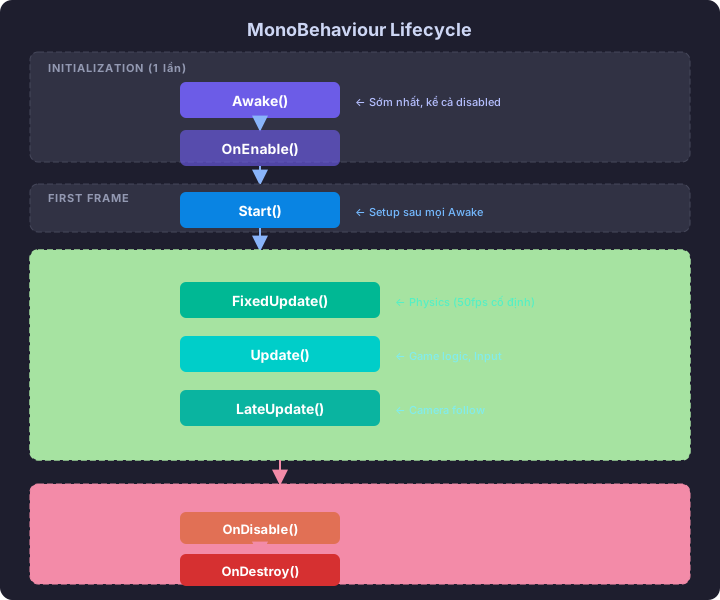
Awake()          ← Đầu tiên, 1 lần, kể cả script disabled
OnEnable()       ← Khi object/script được bật
Start()          ← 1 lần, trước frame đầu tiên
    │
    ▼ (Mỗi frame)
FixedUpdate()    ← Physics update (cố định ~50fps)
Update()         ← Logic update (mỗi frame)
LateUpdate()     ← Sau Update (camera follow thường ở đây)
    │
    ▼
OnDisable()      ← Khi object/script bị tắt
OnDestroy()      ← Khi object bị xóa
Khi nào dùng method nào?
| Method | Timing | Use case |
|---|---|---|
Awake() | Rất sớm, 1 lần | Khởi tạo references |
Start() | Trước frame đầu, 1 lần | Setup ban đầu, đọc config |
Update() | Mỗi frame | Input, game logic, animation |
FixedUpdate() | Cố định interval | Physics (Rigidbody, forces) |
LateUpdate() | Sau mọi Update | Camera follow, UI update |
Ví dụ thực tế
public class GameController : MonoBehaviour
{
    private PlayerController player;
    private int frameCount = 0;

    void Awake()
    {
        // Tìm references sớm nhất
        player = FindObjectOfType<PlayerController>();
    }

    void Start()
    {
        // Setup sau khi mọi Awake() đã chạy
        Debug.Log($"Player found: {player.name}");
    }

    void Update()
    {
        frameCount++;
        // Logic chạy mỗi frame
    }

    void LateUpdate()
    {
        // Camera follow player — chạy SAU player.Update()
    }
}
Input — Nhận đầu vào từ người chơi
Input cũ (vẫn dùng được, đơn giản)
void Update()
{
    // Trục ngang/dọc: -1 đến 1
    float horizontal = Input.GetAxis("Horizontal");  // A/D hoặc ←/→
    float vertical = Input.GetAxis("Vertical");      // W/S hoặc ↑/↓

    // Phím nhấn
    if (Input.GetKeyDown(KeyCode.Space))    // nhấn xuống (1 frame)
        Debug.Log("Jump!");

    if (Input.GetKey(KeyCode.LeftShift))    // đang giữ
        Debug.Log("Sprinting...");

    if (Input.GetKeyUp(KeyCode.Space))      // thả ra (1 frame)
        Debug.Log("Released jump");

    // Chuột
    if (Input.GetMouseButtonDown(0))  // chuột trái
        Debug.Log("Click!");

    Vector3 mousePos = Input.mousePosition;  // pixel position
}
GetKeyDown— true đúng 1 frame khi nhấnGetKey— true liên tục khi giữGetKeyUp— true đúng 1 frame khi thả
Di chuyển Object
Cách 1: Transform.Translate (đơn giản nhất)
public class PlayerMovement : MonoBehaviour
{
    public float speed = 5f;

    void Update()
    {
        float h = Input.GetAxis("Horizontal");
        float v = Input.GetAxis("Vertical");

        Vector3 direction = new Vector3(h, 0f, v);
        transform.Translate(direction * speed * Time.deltaTime);
    }
}
Time.deltaTime — Tại sao cần?
Update() chạy mỗi frame, nhưng frame rate không cố định. Máy mạnh = nhiều frame = di chuyển nhanh hơn. Time.deltaTime = thời gian giữa 2 frame, giúp di chuyển đều bất kể FPS.
// KHÔNG có deltaTime: 60fps = 300 units/s, 30fps = 150 units/s
transform.Translate(Vector3.forward * speed);

// CÓ deltaTime: luôn = 5 units/s bất kể FPS
transform.Translate(Vector3.forward * speed * Time.deltaTime);
Quy tắc: Mọi thứ liên quan đến di chuyển/thay đổi theo thời gian trong Update() luôn nhân Time.deltaTime.
Cách 2: Trực tiếp thay đổi position
void Update()
{
    float h = Input.GetAxis("Horizontal");
    float v = Input.GetAxis("Vertical");

    Vector3 movement = new Vector3(h, 0, v) * speed * Time.deltaTime;
    transform.position += movement;
}
Xoay object
// Xoay liên tục
transform.Rotate(Vector3.up * 90f * Time.deltaTime);  // 90 độ/giây

// Nhìn về phía target
transform.LookAt(targetTransform);

// Nhìn theo hướng di chuyển
if (direction != Vector3.zero)
    transform.forward = direction;
SerializeField & Public — Expose biến ra Inspector
public class PlayerController : MonoBehaviour
{
    // public — thấy trong Inspector + truy cập từ script khác
    public float speed = 5f;

    // [SerializeField] — thấy trong Inspector nhưng vẫn private
    [SerializeField] private int maxHealth = 100;
    [SerializeField] private GameObject bulletPrefab;

    // private không đánh dấu — KHÔNG thấy trong Inspector
    private int currentHealth;
}
Best practice: Dùng [SerializeField] private thay vì public. Giữ encapsulation nhưng vẫn chỉnh được trong Inspector.
GetComponent — Lấy reference đến component khác
public class PlayerHealth : MonoBehaviour
{
    private Rigidbody rb;
    private MeshRenderer meshRenderer;

    void Awake()
    {
        // Lấy component trên CÙNG object
        rb = GetComponent<Rigidbody>();
        meshRenderer = GetComponent<MeshRenderer>();
    }

    void TakeDamage()
    {
        // Đổi màu đỏ khi nhận damage
        meshRenderer.material.color = Color.red;

        // Đẩy lùi
        rb.AddForce(Vector3.back * 5f, ForceMode.Impulse);
    }
}
Tìm object khác
// Tìm theo tên
GameObject player = GameObject.Find("Player");

// Tìm theo tag (nhanh hơn)
GameObject player = GameObject.FindWithTag("Player");

// Tìm theo type
PlayerController pc = FindObjectOfType<PlayerController>();

// Lấy component trên object CON
Weapon weapon = GetComponentInChildren<Weapon>();

// Lấy component trên object CHA
Health parentHealth = GetComponentInParent<Health>();
Lưu ý: Find và FindObjectOfType chậm. Gọi trong Awake/Start, cache kết quả, KHÔNG gọi trong Update.
Instantiate & Destroy — Tạo và xóa object
public class Spawner : MonoBehaviour
{
    [SerializeField] private GameObject enemyPrefab;
    [SerializeField] private float spawnInterval = 2f;
    private float timer;

    void Update()
    {
        timer += Time.deltaTime;
        if (timer >= spawnInterval)
        {
            SpawnEnemy();
            timer = 0f;
        }
    }

    void SpawnEnemy()
    {
        Vector3 randomPos = new Vector3(
            Random.Range(-10f, 10f),
            0f,
            Random.Range(-10f, 10f)
        );

        // Tạo instance từ prefab
        GameObject enemy = Instantiate(enemyPrefab, randomPos, Quaternion.identity);
        enemy.name = "Enemy_" + Time.time;

        // Tự hủy sau 10 giây
        Destroy(enemy, 10f);
    }
}
Instantiate(prefab, position, rotation)— clone prefab thành object mớiDestroy(object)— xóa ngayDestroy(object, delay)— xóa sau delay giâyDestroy(gameObject)— xóa chính object đang chạy script
Coroutine — Hành động trải dài nhiều frame
Cần delay, animation sequence, hoặc spawn theo thời gian? Dùng Coroutine.
using System.Collections;

public class EffectController : MonoBehaviour
{
    void Start()
    {
        StartCoroutine(FlashRed());
    }

    IEnumerator FlashRed()
    {
        MeshRenderer mr = GetComponent<MeshRenderer>();
        Color original = mr.material.color;

        mr.material.color = Color.red;
        yield return new WaitForSeconds(0.2f);  // đợi 0.2s

        mr.material.color = original;
        yield return new WaitForSeconds(0.2f);

        mr.material.color = Color.red;
        yield return new WaitForSeconds(0.2f);

        mr.material.color = original;
        Debug.Log("Flash xong!");
    }
}
IEnumerator— return type cho coroutineyield return new WaitForSeconds(n)— pause n giâyyield return null— pause 1 frameStartCoroutine(...)— bắt đầu chạyStopCoroutine(...)— dừng
Spawn wave enemies
IEnumerator SpawnWave(int count, float delay)
{
    for (int i = 0; i < count; i++)
    {
        SpawnEnemy();
        Debug.Log($"Spawned {i + 1}/{count}");
        yield return new WaitForSeconds(delay);
    }
    Debug.Log("Wave hoàn thành!");
}

// Gọi
StartCoroutine(SpawnWave(5, 1.5f));
Ví Dụ Tổng Hợp: Player Controller hoàn chỉnh
using UnityEngine;

public class SimplePlayerController : MonoBehaviour
{
    [Header("Movement")]
    [SerializeField] private float moveSpeed = 5f;
    [SerializeField] private float rotateSpeed = 720f;

    [Header("Combat")]
    [SerializeField] private GameObject bulletPrefab;
    [SerializeField] private Transform firePoint;
    [SerializeField] private float fireRate = 0.25f;

    private float fireTimer;

    void Update()
    {
        HandleMovement();
        HandleShooting();
    }

    void HandleMovement()
    {
        float h = Input.GetAxis("Horizontal");
        float v = Input.GetAxis("Vertical");
        Vector3 direction = new Vector3(h, 0, v).normalized;

        if (direction.magnitude > 0.1f)
        {
            // Di chuyển
            transform.position += direction * moveSpeed * Time.deltaTime;

            // Xoay về hướng di chuyển
            Quaternion targetRotation = Quaternion.LookRotation(direction);
            transform.rotation = Quaternion.RotateTowards(
                transform.rotation, targetRotation, rotateSpeed * Time.deltaTime);
        }
    }

    void HandleShooting()
    {
        fireTimer -= Time.deltaTime;

        if (Input.GetMouseButton(0) && fireTimer <= 0f)
        {
            if (bulletPrefab != null && firePoint != null)
            {
                Instantiate(bulletPrefab, firePoint.position, firePoint.rotation);
                fireTimer = fireRate;
            }
        }
    }
}
Bài Tập
Bài 1: Patrol Enemy
Tạo script enemy di chuyển qua lại giữa 2 điểm. Dùng [SerializeField] cho speed và 2 Transform waypoints. Khi đến gần waypoint, đổi hướng.
Bài 2: Collectible System Tạo prefab "Coin" (Cylinder vàng, xoay liên tục). Spawn 10 coins random. Khi player đến gần (kiểm tra distance), Destroy coin và tăng score. In score ra Console.
Bài 3: Countdown Timer
Viết script countdown từ 60 về 0. Dùng Time.deltaTime. Khi hết giờ, Debug.Log "Time's up!". Bonus: dùng Coroutine để flash cảnh báo khi còn 10 giây.
Bài trước: Unity #1: GameObject & Component Bài tiếp: Unity #3: Physics — Rigidbody, Collider & Raycast